Showing posts with label Computer. Show all posts

Sunday, May 3, 2009

A notebook by any other name...

Well, I have decided to stray from my Apple-fanism, and purchased a new computer. But not any type of computer; I have decided to take the leap and try out a new category of computer, the netbook. Of course, my first idea was to get a new MacBook, but with finances being what they are, I was left with far too little funding for anything other than a budget laptop. Since that was pretty much out of the question, I started examining these new netbooks. Being a fairly new category, most likely cooked up by some marketing-types, the netbook is essentially a sub-notebook computer. With displays ranging from 7" to 10", most of these devices are designed to be easy to carry.

Currently, the processors of choice for these devices are from Intel's Atom series. Although they are somewhat underpowered compared to many of the newer processors today, they are very, very efficient from a power consumption perspective.

After doing a bit of research through the various manufacturers websites and netbook forums, I settled on Asus. They pretty much started the trend towards these computers with their EeePC series. My biggest problem was making a selection, as Asus offers many different models. I had a few criteria to help me in my selection:

  1. An actual keyboard, not some over-compressed cellphone dialpad

  2. An actual hard drive with a decent capacity, rather than a first-generation flash-based hard drive

  3. Decent build quality

With these points in mind, I narrowed down my choice to the 900HA or the 1000HA. The primary differences with these two devices were:

  • The 900HA has a 8.9" screen, while the 1000HA has a 10.2" screen

  • The 900HA has 0.3 megapixel camera, while the 1000HA has a 1.3 megapixel camera

  • The 900HA has a rated battery life of 4.5 hours, while the 1000HA has a rated battery life of 7.5 hours

Another obvious trade off with the 1000HA is its larger physical dimensions and weight, but when compared, it really isn't such a huge difference. But what sealed the deal was the price; I was able to get the 1000HA for almost $50 less than the 900HA! Go figure.

I got the box home and was looking forward to trying out the little machine. Like all EeePC models, the packaging and contents are basically the same. Although the 1000HA has no CD or DVD drive, Asus conveniently provides a DVD with an image of Windows XP SP3 and drivers. It's a nice addition, although my plans included an installation of Linux on my netbook.

I will post more as I spend time using this great little device!

Wednesday, August 30, 2006

Rumours of Mac Mini hardware update...

Rumours have been flying around about some proposed changes to the Mac Mini line. According to these latest rumours, Apple would keep the existing 1.66 GHz Core Duo model, and add a 1.83 GHz Core Duo model, while dropping the 1.5GHz Core Solo model. This decision would eliminate any Core Solo platforms from Apple's line of computers. No timelines have been indicated yet, but information is sure to leak out any time... Keep in mind that Apple did the same thing to the Mac Mini last year, without advertising the changes in hardware that were made to the model line. Several analysts have suggested that Apple has chosen to follow this strategy in order to liquidate inventory without having to resort to drastic retail price cuts.

More information can be found over at Think Secret, as well as lots of assorted news and rumours...

Wednesday, August 16, 2006

On the purchase on my new Intel Dual Core iMac 20"...

I finally broke down and purchased my new Mac; I got a great deal from Best Buy, who although had the sam price as everyone else, gave a free iPod Nano (1GB) model to anyone purchasing an iMac. It was a no brainer... I decided to get a 512MB RAM model, as I can purchase RAM separately and save almost 200$ in the process. As for the hard drive upgrade, all I can say is that I am satisfied with the present capacity, with the 250GB SATA drive currently installed.

As soon as I got it home, I unpacked it and connected it by FireWire, to my Cube. It took only a few moments, and I was able to browse the Cube from the iMac. I transferred all of my documents, data and files over to the iMac, then connnected it to the router, so that I could get connected to my Powermac. I proceeded to transfer a copy of my Music folder to the iMac, as well as all of my images and movies. With this transfer complete, I wiped the information from the Powermac and liberated almost 85GB of storage space. And with the ability to burn DVD with the iMac, I have been archiving some data on DVD; I may just have to pick up a pack of the Dual Layer DVD-R, with even more capacity.

So far, I am tremendously satisfied with my purchase. It is a very noticeable increase in speed and performance, as well as a definite upgrade where the monitor is concerned. Seeing the iMac and my old 17" monitor side by side really hammered that point in, with the sharpness, brightness and overall size of the iMac LCD dwarfing the 17" CRT.

More on the iMac once I have more information to report...

Sunday, June 4, 2006

A new toy for Mac Mini owners...

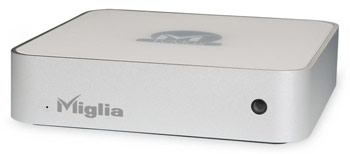
Although add-on drives have been available for the Mac Mini since almost day one, Miglia Technology has announced the availability of TVMax, an add-on drive with a twist; it has some very interesting digital video recorder functionalities while it perfectly matches Apple's Mac mini:


TVMax lets Mac users watch TV in window mode or full screen, convert VHS tapes to DVD quickly and easily and best of all, TVMax records in MPEG-2, MPEG-4 and DivX formats. When bundled with EyeTV 2.0, TVMax is also ideal for iPod Video owners thanks to the exclusive One Click iPod export function.

TVMax is bundled with EyeTV 2, which lets users watch, pause, rewind and skip forward live TV, schedule recordings, access online TV guides, edit recorded TV shows and more. TVMax is also supplied with an infrared remote control. The TVMax is priced at US$249.

Wednesday, May 31, 2006

Macbook Complete Specs...

Technical Specifications for the Macbook

In the Box

MacBook
Apple Remote
60W MagSafe Power Adapter, AC wall plug and power cord
Lithium-polymer battery
Install/restore DVDs
Printed and electronic documentation


Processor and memory

1.83GHz or 2.0GHz Intel Core Duo processor
2MB on-chip shared L2 cache
667MHz frontside bus
512MB of 667MHz DDR2 SDRAM (PC2-5300) on two SO-DIMMs; supports up to 2GB
Storage
60GB or 80GB 5400-rpm Serial ATA hard disk drive; optional 80GB, 100GB or 120GB drive2


One of the following optical drives:
Slot-loading Combo drive (DVD-ROM/CD-RW): reads DVDs at up to 8x speed, writes CD-R discs at up to 24x speed, writes CD-RW discs at up to 16x speed, reads CDs at up to 24x speed
Slot-loading SuperDrive with double-layer read support (DVD+R DL/DVD±RW/CD-RW): writes DVD-R and DVD+R discs at up to 4x speed, writes DVD-RW and DVD+RW discs at up to 4x speed, reads DVDs at up to 8x speed, writes CD-R discs at up to 24x speed, writes CD-RW discs at up to 10x speed, reads CDs at up to 24x speed


Graphics and Video Support
Intel GMA 950 graphics processor with 64MB of DDR2 SDRAM shared with main memory1
Extended desktop and video mirroring: Simultaneously supports full native resolution on the built-in display and up to 1920 x 1200 pixels on an external display, both at millions of colours

Built-in iSight camera with 640-by-480-pixel resolution

Mini-DVI port
DVI output using mini-DVI to DVI adapter (sold separately)
VGA output using mini-DVI to VGA adapter (sold separately)
Composite and S-video output using mini-DVI to video adapter (sold separately)

Communications
Built-in 10/100/1000BASE-T Gigabit Ethernet (RJ-45 connector)
Built-in 54-Mbps AirPort Extreme wireless networking (based on 802.11g standard)
Built-in Bluetooth 2.0 + Enhanced Data Rate (EDR) up to 3 Mbps
Optional external Apple USB Modem

Audio
Built-in stereo speakers
Combined optical digital audio input/audio line in (minijack)
Combined optical digital audio output/headphone out (minijack)

Battery and power
55-watt-hour lithium-polymer battery with integrated charge indicator LEDs
60W MagSafe Power Adapter with cable management system
MagSafe power adapter port

Display
13.3-inch (diagonal) glossy widescreen. TFT display with support for millions of colours
Supported resolutions: 1280 by 800 (native), 1152 by 720, 1024 by 768, 1024 by 640, 800 by 600, 800 by 500, 720 by 480, and 640 by 480 at 16:10 aspect ratio; 1024 by 768, 800 by 600, and 640 by 480 pixels at 4:3 aspect ratio; 720 by 480 at 3:2 aspect ratio

Electrical and environmental requirements
Meets ENERGY STAR requirements
Line voltage: 100-240V AC
Frequency: 50Hz to 60Hz
Operating temperature: 10° to 35° C
Storage temperature: -24° to 45° C
Relative humidity: 0% to 90% noncondensing
Maximum operating altitude: 10,000 feet
Maximum storage altitude: 15,000 feet
Maximum shipping altitude: 35,000 feet

Peripheral connections
One FireWire 400 port (up to 400 Mbps)
Two USB 2.0 ports (up to 480 Mbps)

Security
Kensington cable lock slot

Software
Mac OS X v10.4 Tiger (includes Spotlight, Dashboard, Mail, iChat AV, Safari, Address Book, QuickTime, iCal, DVD Player, Xcode Developer Tools)
iLife ’06 (includes iTunes, iPhoto, iMovie HD, iDVD, iWeb, GarageBand), Microsoft Office 2004 for Mac Test Drive, iWork (30-day trial), Big Bang Board Games, Comic Life, Omni Outliner, and Apple Hardware Test
Front Row

Input
Built-in full-size keyboard with 78 (U.S.) or 79 (ISO) keys, including 12 function keys, 4 arrow keys (inverted "T" arrangement), and embedded numeric keypad
Solid-state scrolling trackpad for precise cursor control; supports two-finger scrolling, tap, double-tap, and drag capabilities

Apple Remote

Size and weight
Height: 2.75 cm (1.08 inches)
Width: 32.5 cm (12.78 inches)
Depth: 22.7 cm (8.92 inches)
Weight: 2.36 kg (5.2 pounds)

The new Mac Book...

So Apple has finally announced the new Mac Book, and I have to say that I am fairly impressed so far... Those who know me also know that I have been in the market for a new computer (or two) lately, and this new addition by Apple is making my selection that much more difficult. Obviously, this new iBook replacement is based on the Inter Core Duo chip, and also includes Apple's new patented "glossy screen", which is not only brighter (a common complaint amongst iBook users), but has much better saturation, which makes images seem that much better! And, it's also available in glossy black, which is also a really nice change:


Head over to Apple's website and check it out for yourself, you may be pleasantly surprised; I know that my shopping list may just have to include one of these beauties!

Tuesday, May 23, 2006

Windows XP install on Mac Intel

As we may have all been reading lately, a winner has been declared in the running contest to get this done. The winner of the contest, known only as "narf," will pick up a cash prize of $13,854, accumulated through donations from contest supporters and other third-party sponsors. As reported in Ars Technica, here are some more details about this feat.

Here is what you'll need:

A Windows XP Pro (SP2) CD. Apparently, it does not have to be a bootable CD, but it does require the i386 directory at root level.

The xom.zip file.
Nero Burning ROM
A blank CD
A PC of course...
20-30 minutes

The instructions lay out the entire process in an abbreviated manner for those users who are more adept at performing "advanced" tasks like repartitioning drives and such, and in a more basic, step-by-step manner for users who might be slightly intimidated by the exercise. When you get down to it, you're creating a custom XP bootdisk, with some of the Microsoft files replaced with patched files created by narf. The files modified/added in the i386 folder are:

iaStor.sys
NTDETECT.COM
TXTSETUP.SIF
WINNT.SIF
XOM.INF

In addition there are several files being replaced and/or added in the $OEM$ directory:

$$/system32/drivers/xomdd.sys
$1/drivers/iastor/iaahci.cat
$1/drivers/iastor/iaahci.inf
$1/drivers/iastor/iaStor.cat
$1/drivers/iastor/iaStor.sys
$1/drivers/iastor/TXTSETUP.OEM

The final 5 items are replicated in the $OEM$/TEXTMODE directory. Once the custom Windows XP bootdisk has been developed, a repartition is required on the iMac's disk to contain both HFS+ and NTFS partitions, which for most people, means you're probably going to have to blow away your current install. Mac OS X will be installed to an HFS+ partition and you'll be installing an xom.efi bootloader which will then allow you to install Windows XP from your new disc.

At this point you're more or less dealing with a situation no different than your run-of-the-mill budget PC.