Showing posts with label Hardware. Show all posts

Sunday, September 20, 2009

New iPod Nano

Well, Apple has released a new generation of the iPod Nano, and once again, they've added features that make the device even more useful than it used to be. Taking a cue from the newly released third generation iPod Shuffle as well as the iPod Touch (and iPhone, of course), the new iPod Nano has incorporated many new features that set it above the average player. First is the Voice Over feature, which tells you the song name and who’s performing it without interrupting the music; it's available in over twenty languages, including: Chinese (Cantonese), Chinese (Mandarin), Czech, Danish, Dutch, English, Finnish, French, German, Greek, Italian, Japanese, Korean, Norwegian, Polish, Portuguese, Russian, Spanish, Swedish and Turkish.

Second, the new Nano features a video camera with 640 by 480 pixels in H.264, up to 30 frames per second with AAC audio to boot! There are even some live effects which can be used with the video, including Sepia, Black and White, X-Ray, Film Grain, Thermal, Security Cam, Cyborg, Bulge, Kaleido, Motion Blur, Mirror, Light Tunnel, Dent, Stretch, and Twirl.

But that's just the first part; one of the interesting sub-functionality of this setup is the addition of the microphone. Apple has thoughtfully added a voice recording functionality into the menu.

Apart from this new multimedia functionality, Apple has also added another often requested feature: an FM tuner, with a few additions thrown in of course. The feed feature identifies stations and songs (if the information is broadcast) which is always a nice way to find out about new music, and the Live Pause feature, which allows you to pause live radio broadcasts, and rewind up to 15 minutes! It's like a PVR, but for radio! A nice feature in my opinion. In the past, there have been accessories that provided the same function, but it's nice to have it built-in.

One of the nice things about the iPod series is the support for several high quality audio formats, including Apple's own AAC (8 to 320 Kbps), Protected AAC (from iTunes Store), HE-AAC, MP3 (8 to 320 Kbps), MP3 VBR, Audible (formats 2, 3, 4, Audible Enhanced Audio, AAX, and AAX+), Apple Lossless, AIFF, and WAV.

The Nano now sports a polished anodized finish in 9 different colours, including silver, black, red (from Apple only), yellow (from Apple only), blue, purple, pink, green, and orange:

If you are in the market for a new MP3 player, head to your nearest Apple store, or any electronic retailer, and take a look at the new Nano. It might just be the one for you.

Saturday, August 15, 2009

A new option from Canon

This year, Canon released a new camera that has not received the attention it should have. I'm talking about the new PowerShot D10:

They say that an image is worth a thousand words, and I believe that the above image has a lot to say about Canon's entry into a field that was dominated at the amateur end by Olympus and at the professional end by Nikon. Of course, the D10 is a point and shoot camera and nothing more, but it is designed to be rugged and waterproof, while maintaining Canon's basic PowerShot features.

The D10 is designed with the following parameters:

Waterproof to 10 meters (33 feet)
Shock resistant 1.22 meters (4 feet)
Minimum operating temperature -10 Celsius
Dustproof

This should make it an ideal solution for active people. Personally, I think it's a nice solution for everyday picture taking. Don't get me wrong, it's no replacement for my Canon SLR, but it's got decent functionality, and some pretty good specifications for the price:

Canon PowerShot D10 specifications:

Sensor
• 1/2.3" Type CCD
• 12.1 million effective pixels

Image sizes
• 4000 x 3000
• 4000 x 2248
• 3264 x 2448
• 2592 x 1944
• 1600 x 1200
• 640 x 480
• 320 x 140

Movie clips
• 640 x 480 @ 30fps [L]
• 320 x 240 @ 30fps [M]

Maximum clip length
• Upto 4GB or 1 hour [L or M]

File formats
• JPEG (Exif v2.2)
• DPOF 1.1
• MOV [H.264 + Linear PCM (Monaural)
• WAVE (Sound Files)

Lens
• 35 - 105mm (35mm equiv)
• 3x optical zoom
• F2.8-4.9

Image stabilization
Yes (Lens-Shift)

Digital zoom
up to 4x

Focus
TTL

AF area modes

• Face Detection AiAF / 9 point
• 1-point AF (center or Face Select and Track)

AF lock
Yes (On/Off Selectable)

AF assist lamp Yes

Focus distance
Closest focus distance 3 cm

Metering
• Evaluative (linked to Face Detection AF frame)
• Center-weighted average
• Spot (center or linked to Face Detection)

ISO sensitivity
• Auto
• ISO 80
• ISO 100
• ISO 200
• ISO 400
• ISO 800
• ISO 1600

AE lock
Yes (on/off selectable)

Exposure compensation
+/- 2EV in 1/3 stop increments

Shutter speed
15-1/1500 sec

Modes
• Auto
• Scene
• Movie

Scene modes
• Program
• Portrait
• Night Snapshot
• Kids & Pets
• Indoor
• Sunset
• Fireworks
• Long Shutter
• Beach
• Underwater
• Aquarium
• Foliage
• Snow
• ISO 3200
• Digital Macro
• Color Accent
• Color Swap
• Stitch Assist

White balance
• Auto (including Face Detection WB)
• Daylight
• Cloudy
• Tungsten
• Fluorescent
• Fluorescent H
• Custom

Self timer
• 2 or 10sec
• Custom or Face Self Timer

Continuous shooting
• Approx 1.1fps

Image parameters
My Colors (My Colors Off, Vivid, Neutral, Sepia, Black & White, Positive Film, Lighter Skin Tone, Darker Skin Tone, Vivid Blue, Vivid Green, Vivid Red, Custom Color)

Flash
Auto, Manual Flash On / Off, Red-Eye Reduction, Slow Sync
• Face Detection FE compensation
• Flash exposure lock
• Range (30cm - 3.2m (W) / 2m (T)
• External HF-DC1 flash (optional)

LCD monitor
• 2.5" TFT
• 230,000 pixels
• 100% coverage
• Adjustable

Connectivity
• USB Hi-Speed
• AV out (PAL / NTSC switchable)

Storage
• SD, SDHC, MMC, MMCplus, HC MMCplus

Power
Rechargeable Li-ion Battery NB-6L

Weight (no batt)
190 g

Dimensions
104 x 67 x 49 mm

Thursday, August 6, 2009

Amazon's Kindle has some competition from Sony

It was bound to happen. After the popular online book retailer Amazon introduced their ebook reader, the Kindle, it was just a matter of time before another manufacturer attempted to jump on the bandwagon of ebook readers. Well, Sony announced two new readers today, the Reader Pocket Edition and the Reader Touch Edition. Sony plans to have the devices out at the end of the month and with a pricing structure that puts it at the same price or just below the Kindle.

The Pocket Edition has a five-inch display, will be available is three colours for the moment, including navy blue, rose and silver, and is sized to fit in a jacket pocket or a purse. It will store about 350 standard eBooks and will last about two weeks on a single charge, if we are to believe Sony's claims.

The Touch Edition is a little bit larger, with a six-inch display that you can control, as the name indicates with touch, using either your finger, a stylus or the virtual keyboard. The device will also includes a built-in Oxford American English Dictionary as well as Memory Card and SD card slots, for additional storage space. Sony has indicated that both models make use of an E Ink Vizplex electronic paper display, that according to Sony representatives, "mimics the look of ink on paper.

The software provided will be compatible with both PCs and Apple platforms and allow users to read documents in several formats, including PDF, Word, BBeB and other text files. Sony has also created an eBook Store online, and new releases and New York Times bestseller titles will be priced at $9.99. The readers will also have access to the 1 million free public domain books that Google has currently digitized. What remains to be seen is Sony's response to the public pressure against their draconian DRM application.

It will be interesting to see what Amazon's response is to Sony's step into this market. I can only anticipate price reductions on current Kindle models, and perhaps some hardware revisions in the near future? It remains to be seen.

Thursday, July 16, 2009

Building your own arcade cabinet

I've always thought of myself as young at heart, but I am starting to notice that I am physically a little older than that! The other day, I was reminiscing (yes, that was one of the first things that clued me in to the fact that I was getting older) about an entertainment venue that has literally disappeared: the arcade and arcade cabinets. I spent a large part of my youth dropping quarters into these gaming machines and there are days when I really miss it.

Of course, in a fit of sentimentality, I installed the MAME emulator and thousands of ROMS on my iMac, easily replaying the great games of my youth. But something was missing; part of the fun of the arcade was getting to play on a stand up console, with controls that were meant to be used forcefully. And that got me thinking. Wouldn't it be possible to build a stand up cabinet that would essentially be a large PC case running MAME (and/or other existing emulators), with hard drive storage to hold thousands of ROMS and more. That idea really got me going, so I began to do a little research into the hardware that would be required to make this gaming cabinet a reality and any other related information.

The cabinet

The cabinet itself can be built using MDF or another similar material, and is not beyond the skills of most people. Several plans are available online, but it is quite easy to design your own cabinet. A friend suggested using cardboard from furniture and appliance boxes to build a life-size mockup, as it would allow the designer to refine the cabinet design before actual construction can begin.

The monitor

It is possible to purchase monitors in the required sizes, for these exact purposes from manufacturers like Vision Pro. Nowadays, it is also possible to get an LCD panel of the correct dimensions, for a more energy-saving cabinet. For some cost savings, it is possible to substitute a regular tube television, which are now available for a fraction of what they were worth only a few years ago. If you do choose this route, make sure that you select a flat tube television, as it will make your cabinet look that much better.

The CPU

For the CPU, the sky is really the limit; any system that will run MAME or any other emulator, with support for USB, audio and video will do the trick. An astute builder might also consider that the CPU and motherboard will determine the overall limitations of the cabinet, and could also help to provide additional functionalities (the gaming cabinet could also be a modern jukebox!).


The controls


This is the portion that I thought might be difficult to find, but was I ever wrong. Several companies build hardware for arcade consoles, including the best I found, X Arcade as well as other manufacturers, such as Arcade Controls and Suzo-Happ.

This is commercial quality hardware and should help to build a durable, high quality cabinet.

Other hardware

It is even possible to get a coin-operation panel for your custom-built arcade cabinet. Yes, you can make your machine coin-operated as well (in my opinion, it would be an excellent way to keep your kids off of your cabinet!!!)

Why not try your hand at a project like this? A quick Google and Wikipedia search revealed dozens of related sites, images and tutorials, so go ahead, build a little flash from the past and have fun. Take a look at some of the following links for more information:

BYOACWiki - A fantastic resource for the DIY Arcade cabinet builder.

Webb's MAME Arcade Cabinet - A DIY guide to a great MAME cabinet.

MAME Arcade Cabinet - Another DIY site, with lots of information.

Wednesday, July 15, 2009

Using the Garmin Nuvi 250

I've had the the Garmin Nuvi 250 for about a month now, and have used it several times in order to get a feel for how the device operates and how accurate it is for everyday navigation. So far, I have been very impressed with the ease of use of the device, and its navigation accuracy. Now don't get me wrong, the device has its bugs. For instance, I have not been able to get the device to map out a route to my father's residence. No matter how I select my dad's address, the Nuvi just hangs at 80% completion, and will not begin navigating. It's odd, and I've been able to get it to map a route to an address on a neighbouring street, and that seems just fine.

I've also used the device on foot for geocaching on several occasions, and have found that it was just as accurate, and more useful than my Garmin eTrex. I have been able to connect it to my wife's iMac without problem (it is recognized as an external drive) and it has been very simple to add waypoints using the computer instead of entering them manually into the device. The most pleasant surprise was to find that the Nuvi recharges when it is connected to a computer through USB. A truly useful feature. I have also been very impressed with some of the useful software utilities provided by Garmin. These tools can make route planning a little simpler, and uploading these routes to the device a piece of cake.

I will post more information on my experiences as I continue to use this fantastic gadget.

Tuesday, July 14, 2009

A couple months with my netbook

I've been using the Asus EeePC 900HA for a couple months now, and I am still quite satisfied with my purchase. As with any other electronic device, there are changes that I would appreciate in a future replacement, but they don't make the netbook any less usable. I have used it on pretty much daily basis for almost 2 months now, and it has stood up to that use, and more. Most of my use currently is being done outdoors, so although cooling has not been a problem, exposure to dust and other particulates has.

Like most plastic devices, the EeePC is a dust magnet, and I have not been able to keep it clean for the life of me. Another factor that has been bothering me is my inability to turn the touchpad off. Since I am using a wireless mouse with the netbook, the touchpad has only served to cause typos when my thumb inadvertently touches it and moves the cursor in mid-sentence. The battery life has also been much less than anticipated or claimed by Asus. At most, I'm able to get 4.5 solid hours of use from the device, under low load conditions, mind you. Personally, I count on 3 hours of actual, everyday use, with some reserve power to save files and shutdown the system adequately.

Other things I've noticed include flickering of the backlight at the lowest setting; as I've mentioned, I often use my netbook outdoors, and frequently at night. The second lowest brightness setting is more than required in these circumstances, but that is when the flickering is the most obvious. A more annoying bug has been the reconnection to a wireless network after coming back from a suspend mode; about once out of three times, I need to reboot the computer to get the wireless to work again. This last issue might have more to do with the operating system (I've been using Eeebuntu with the Netbook Remix as my OS) than the actual hardware, but I have no real way of confirming or denying such a claim.

I will continue to post more information on my experiences, but so far, I am quite satisfied with my little machine.

Friday, July 10, 2009

New Macbook Pro 13"

The Macbook Pro product line has just received some minor upgrades and a new model, the 13" Macbook Pro. And although initially, it did not look like a huge change, after further consideration, it seems like Apple has really hit on a great combination of functionality, design and price, making the Macbook Pro 13 available to almost everyone.

Here are the specs for the two new models of the 13" Pro:

Size and weight

Height: 0.95 inch (2.41 cm)
Width: 12.78 inches (32.5 cm)
Depth: 8.94 inches (22.7 cm)
Weight: 4.5 pounds (2.04 kg)

Connections and expansion

* MagSafe power port
* Gigabit Ethernet port
* One FireWire 800 port (up to 800 Mbps)
* One Mini DisplayPort
* Two USB 2.0 ports (up to 480 Mbps)
* One SD card slot
* Audio in/out (combined)
* Kensington lock slot

Communications


* Built-in AirPort Extreme Wi-Fi wireless networking (based on IEEE 802.11n draft specification); IEEE 802.11a/b/g compatible
* Bluetooth Built-in Bluetooth 2.1 + EDR (Enhanced Data Rate)
* Built-in 10/100/1000BASE-T Gigabit Ethernet (RJ-45 connector)

Audio

* Built-in stereo speakers
* Built-in omnidirectional microphone
* Combined optical digital output/headphone out (user-selectable analog audio line in)
* Supports Apple Stereo Headset with microphone

Display

* 13.3-inch (diagonal) LED-backlit glossy widescreen display with support for millions of colors
* Supported resolutions: 1280 by 800 (native), 1152 by 720, 1024 by 640, and 800 by 500 pixels at 16:10 aspect ratio; 1024 by 768, 800 by 600, and 640 by 480 pixels at 4:3 aspect ratio; 1024 by 768, 800 by 600, and 640 by 480 pixels at 4:3 aspect ratio stretched; 720 by 480 pixels at 3:2 aspect ratio; 720 by 480 pixels at 3:2 aspect ratio stretched

Graphics and video support

* NVIDIA GeForce 9400M graphics processor with 256MB of DDR3 SDRAM shared with main memory3
* Dual display and video mirroring: Simultaneously supports full native resolution on the built-in display and up to 2560 by 1600 pixels on an external display, both at millions of colors
* iSightBuilt-in iSight camera
* Mini DisplayPort

Input

* Built-in full-size backlit keyboard with 78 (U.S.) or 79 (ISO) keys, including 12 function keys and 4 arrow keys (inverted “T” arrangement)
* Multi-Touch trackpad for precise cursor control; supports two-finger scrolling, pinch, rotate, swipe, three-finger swipe, four-finger swipe, tap, double-tap, and drag capabilities

Processor and memory

Intel Core 2 Duo

* 2.26GHz or 2.53GHz Intel Core 2 Duo processor with 3MB on-chip shared L2 cache running 1:1 with processor speed
* 1066MHz frontside bus
* 2GB (two 1GB SO-DIMMs) or 4GB (two 2GB SO-DIMMs) of 1066MHz DDR3 memory; two SO-DIMM slots support up to 8GB

Storage

* 160GB or 250GB 5400-rpm Serial ATA hard drive; optional 320GB or 500GB 5400-rpm hard drive, or 128GB or 256GB solid-state drive4
* 8x slot-loading SuperDrive (DVD±R DL/DVD±RW/CD-RW)
* Maximum write: 8x DVD-R, DVD+R; 4x DVD-R DL (double layer), DVD+R DL (double layer), DVD-RW, DVD+RW; 24x CD-R; 10x CD-RW
* Maximum read: 8x DVD-R, DVD+R, DVD-ROM; 6x DVD-ROM (double layer DVD-9), DVD-R DL (double layer), DVD+R DL (double layer), DVD-RW, DVD+RW; 24x CD

Battery and power

* Built-in 60-watt-hour lithium-polymer battery
* 60W MagSafe Power Adapter with cable management system
* MagSafe power port

And here are a few more images, including a comparison shot between the previous unibody Macbook and the new Macbook Pro:


Thursday, June 11, 2009

GPS for cheap: the Garmin Nuvi 250

The Source, by Circuit City, is currently having a huge sale, and one of the clearance items is the Garmin Nuvi 250 GPS. Since I had been toying with the idea of a new GPS for a long time now, all that was needed was the impression that I wasn't getting ripped off. At the price it was going for (which was a little over 50% off the retail price), I couldn't miss the opportunity.

There are more sophisticated devices around, but I did not require many of the features supported by these more expensive models. What I was looking for was good GPS reception, ease of use and a decent base map. And that's what I got with the Nuvi and more.

The Nuvi 250 includes the following items in the box:

- Nuvi 250 unit
- Vehicle suction cup mount to mount the GPS to the windshield or other convenient spot
- 12v cigarette lighter power adapter for charging / powering the unit
- Dashboard disk for mounting the suction cup mount on your dashboard instead of the windshield (due to some legal prohibitions from mounting of anything in the windshield in some areas)
- Set up and go guide

Some of the more expensive Nuvi models also include a slipcase for the unit, but the 250 skips out on this useful accessory, in an effort to reduce costs as much as possible, I imagine.

I got the box opened, and was pleasantly surprised to find out that the battery was indicating at least 75% charge, which does not seem to happen often with rechargeable devices. The initial setup and satellite acquisition took a little over 1 minute, and I was ready to navigate, which I did. I took a short drive through the many side streets of my neighbourhood and was pleasantly surprised to find that the Nuvi kept up admirably, and with great accuracy. I parked for a few moments and decided to enter my home address, which was made easier by the Garmin database automatically assuming that my search would be in the immediate area. Once entered, it was simple enough to follow the prompts as they were called out. Did I mention the level of acccuracy was many orders higher than my previous Garmin GPS unit, the discontinued E Trex Legend.

The unit provides numerous other functions that are useful in travel situations, such as a calculator, unit converter, picture viewer and more. It also provides numerous search functionalities that allow the user to search from a database of over 6 million points of interest (POI), including hospitals, fire stations, police, restaurants, stores and more. As well, the entire North American highway system is integrated into the device, providing all entry and exit points, junctions and more. The ability to enter new POIs as well as the possibility of entering navigational coordinates make this device useful for geocaching as well. This is reflected in a usage setting within the device that allows the user to set the device for automobile, bicycle or pedestrian use.

Garmin claims 5 hours from the rechargeable internal battery, and I have yet to test this claim. My only issue stems from the lack of an AC charging cable along with the kit. I understand that this device is meant to be used in a vehicle primarily, but would it have killed them to make a combination adapter for home and vehicle use? Happily, I noted that the unit charges from a USB connection to any computer, and now, with the addition of a Garmin browser plug-in, it is also possible to send addresses from Google Maps right to the device. Truly a fantastic and useful option for any user.

Addendum: Upon further testing, I discovered that the Garmin browser plug-in also allows users to download cache information from Geocaching.com, which is another added bonus. I also discovered what I believe is the reason for the low price on the device I purchased. Upon closer examination, what was intended to be an SD card slot turned out to be a MiniSD card slot. As it is stated in the included user guide, the slot may be one or the other! At least, Garmin makes maps available on MiniSD as well as SD cards!

Thursday, May 28, 2009

Replacing a fantastic mouse... With another fantastic mouse

Well, today is my birthday and my wonderful wife has once again selected a perfect gift to celebrate the occasion, a new Logitech® V550 cordless laser mouse. I had been in the market for a new mouse to replace my previous Logitech® cordless mouse. I can't fault Logitech® when it comes to building mice and trackballs. I have used several of their products in the last 15 years and once again, I have confirmation as to why they are the leader in this industry. Three years ago, when I replaced my original Apple Mighty Mouse with a Logitech V400 Cordless laser mouse, I wrote a short review for it here. Since then, I have given this mouse to my wife and it still works very well to this day.

The V550 is part of Logitech®'s new line of cordless laser mice, with the new Hyperspeed scroll wheel. In essence, the new scroll wheel is weighted and supported by low friction points, allowing a smooth, continuous motion in use. With a nice tactile feedback, this new wheel is what sold me initially to the new series of devices out this year. It is a three button mouse, but the third button is small, and right in the center of the mouse, just below the scroll wheel, as seen on the image below (courtesy of Logitech®):

The mouse is on the smaller side, designed for notebook users specifically, especially when taking into account the newly redesigned USB Nano Receiver included with the design:

The receiver is so small that the USB adapter portion is almost three times as long! This allows the receiver to stay connected to a notebook without concern about accidental breakage when putting the laptop into a bag. Logitech® has also conveniently provided an internal storage space for the receiver, to allow for convenient travel. Storing the receiver inside the mouse toggles an off switch, preventing unnecessary power drain when not in use.

Speaking of power, Logitech® claims an ultra-long 18 months of expected battery life! The dual AA batteries add a small amount of weight to the device, but should provide at least twice the expected lifespan. On close examination of the underside of the mouse, it is easy to see that Logitech® has considered power management with this device:

A power button is thoughtfully provided, allowing the user to turn off the device when not in use. You may have noticed the metallic bracket in the center of mouse, with a recessed button. This is part of Logitech®'s Clip-and-Go Dock feature. Using a provided metal adhesive-backed attachment pin, it is possible for a user to attach the mouse to a laptop cover for convenient carrying:

A simple removal tool is provided, as well as a second attachment pin, in a convenient little tin.

Logitech includes the following in the retail package:

o Logitech® V550 Nano Cordless Laser Mouse for Notebooks
o 2.4 GHz Plug-and-Forget Nano-receiver
o 2 Clip-and-Go docks
o 1 Clip-and-Go storage box
o 1 Clip-and-Go dock-removal tool
o Desktop USB extension stand
o 2 AA batteries
o 2 cleaning wipes
o Quick-start guide
o 3-year limited hardware warranty

Logitech® no longer includes CDs in their packaging, but drivers are easily available online from their website. The new Control Center (for both Windows and Apple platforms) allows the user to customize the actions of each button on the mouse, in a simple and easy to use fashion. I use this mouse on a netbook (an Asus 1000HA) running Ubuntu, and although the Control Center is not available under Linux, the mouse still functions very well. It is not possible to configure the buttons in the same way as possible under Windows or OS X, but features like acceleration and scroll speed can be set easily.

So far, I am completely impressed with this mouse, and I have to thank my wife again for this thoughtful gift!

Sunday, May 3, 2009

A notebook by any other name...

Well, I have decided to stray from my Apple-fanism, and purchased a new computer. But not any type of computer; I have decided to take the leap and try out a new category of computer, the netbook. Of course, my first idea was to get a new MacBook, but with finances being what they are, I was left with far too little funding for anything other than a budget laptop. Since that was pretty much out of the question, I started examining these new netbooks. Being a fairly new category, most likely cooked up by some marketing-types, the netbook is essentially a sub-notebook computer. With displays ranging from 7" to 10", most of these devices are designed to be easy to carry.

Currently, the processors of choice for these devices are from Intel's Atom series. Although they are somewhat underpowered compared to many of the newer processors today, they are very, very efficient from a power consumption perspective.

After doing a bit of research through the various manufacturers websites and netbook forums, I settled on Asus. They pretty much started the trend towards these computers with their EeePC series. My biggest problem was making a selection, as Asus offers many different models. I had a few criteria to help me in my selection:

  1. An actual keyboard, not some over-compressed cellphone dialpad

  2. An actual hard drive with a decent capacity, rather than a first-generation flash-based hard drive

  3. Decent build quality

With these points in mind, I narrowed down my choice to the 900HA or the 1000HA. The primary differences with these two devices were:

  • The 900HA has a 8.9" screen, while the 1000HA has a 10.2" screen

  • The 900HA has 0.3 megapixel camera, while the 1000HA has a 1.3 megapixel camera

  • The 900HA has a rated battery life of 4.5 hours, while the 1000HA has a rated battery life of 7.5 hours

Another obvious trade off with the 1000HA is its larger physical dimensions and weight, but when compared, it really isn't such a huge difference. But what sealed the deal was the price; I was able to get the 1000HA for almost $50 less than the 900HA! Go figure.

I got the box home and was looking forward to trying out the little machine. Like all EeePC models, the packaging and contents are basically the same. Although the 1000HA has no CD or DVD drive, Asus conveniently provides a DVD with an image of Windows XP SP3 and drivers. It's a nice addition, although my plans included an installation of Linux on my netbook.

I will post more as I spend time using this great little device!

Wednesday, January 2, 2008

New Bluetooth keyboard

Hello all! First of all, my apologies for not creating a new post in quite a while, but I plan on making the most of 2008.

For my first post of the year, I thought we would take a look at Apple's new Bluetooth Wireless Keyboard:

This keyboard follows Apple's new design and improves on the portability of the keyboard by removing the extra numeric keyboard available on the wired version.

A side view of the keyboard is a testament to the minimalist design philosophy that Apple has adopted lately, and as some have said "either you love it or you hate it!"

Personally, I am in the LOVE camp, and I can't wait to get my grubby hands on one. I don't make much use of the Bluetooth functionalities of my Mac, and I think it's high time that I did. The keyboard is wisely powered by 3 AA format batteries (included with the initial purchase no less!!), and the smart power management turns the keyboard off during periods of inactivity, only to resume function as soon as the user begins typing again. I would really like to know what real-world power usage is like for one of these babies!

More information will follow as soon as I have performed some testing.

Until then...
---
Well, I do have an update. My wonderful wife got me a new Apple Keyboard for Christmas, and let me tell you, it is by far the best keyboard that I have had the chance to use. Not only aesthetically pleasing, this keyboard has a fantastic action that is the same as the wireless version. I was very happy to receive the wired version, as I make use of the USB ports on the keyboards, and these are still available on the new version.

A sweet keyboard!!

Sunday, March 18, 2007

And now, the iPhone

By now, most Apple fans have already seen the prototype iPhone that Steve Jobs revealed in his last presentation. And what a great looking device:


But is this the killer device that many people are speculating about, or is it another bloated, RIM clone that have been popping up here and there in the last couple years? To be honest, I'm not sure! I haven't had a chance to actually use one of these slick-looking devices. But from a conceptual point of view, I can't help but think that this isn't it... As you pick you jaw off the floor, please remember that I am an Apple fan, but first and foremost, I am a fan of great concepts! The iPhone (and never mind the legal issues surrounding the choice of names) is a great looking, and probably easy to use device, but it's not doing anything for me...


There are many schools of thought when it comes to the ultimate portable device; what types of features should these devices include are the primary areas of differences. What remains similar are the basic elements, such as the form factor, and weight, and even then, there have been noted differences in concepts, such as the Sony PSP:


or a different Sony solution, the UX390N:


and even the Nokia 770:


Everyone has a different idea of what this type of device should do, and so do I... I will reserve judgement until I can actually test the device out for myself.

Until then...

Monday, October 23, 2006

What about iTV?

For those who may not have heard the news, Apple is trying really hard to take over your living room. All kidding aside, Steve Jobs announced, during the last keynote presentation, that Apple was hard at work on a new device, codenamed iTV (since the name is already in use by Monster Cable, I doubt the name will stick!) and it was set to revolutionize your living room by bringing Apple smack-dab in the middle!

Of course, since the keynote, where some details about the capabilities of this new device were announced, there has been a lot of speculation about what would and would not be included at launch, scheduled for Q1 of 2007. Here is the shot that was displayed during the presentation:


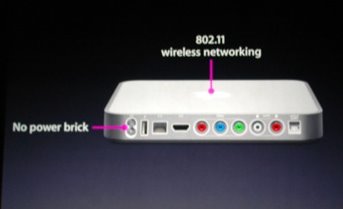
As you can see, the iTV follows the form factor of the Mac Mini, and from the picture of the rear of the device, we can deduce some of the features:


During his speech, Steve Jobs alluded to some of the functions that will be available on the multimedia device:

  • HDMI connector (x1)

  • Component Video connectors (x1)

  • Audio L/R

  • Digital audio (x1)

  • Ethernet and 802.11g

  • USB 2.0

  • And a built-in power supply, eliminating any external power bricks

With this pretty impressive list of features, as well as full integration with iTunes on both the Mac and the PC platform, and an announced retail price of $299, Apple is going to make a dent in the multimedia market, that's sure.

Engadget has posted a hands-on review of a prototype device. As far as I can see, the prototype looks exactly like the device displayed during the keynote. Another hot debate going on is whether the iTV will support any PVR-type functionality, as well as a hard drive. Both topics remain to be seen!

The Sony PSP and Apple...

As soon as I saw the Sony PSP, I fell in love with it. I know, you may get a laugh out of this, but as a geek at heart, any neat gadget really gets my attention. And the PSP was great! I had to have one, and a few months ago, when an upcoming trip to India gave me reason to shell out the money, I bought my PSP. I purchased the Giga Pack, which Sony was promoting as a great deal: the PSP, a carry case, a 1GB Memory Stick Duo card. I also wound up pickup up a couple games (for your information, Grand Theft Auto: Liberty City Stories and Syphon Filter, both excellent games in my opinion).

In the time I've had my PSP, several friends have suggested that I mod it, but I didn't want to go that route, because I just don't find any advantage to free gaming, if I need to get memory cards to store these games. But my concern has come with my platform of choice, OS X. Since the PSP has USB connectivity, the thought that both devices would be fully compatible did cross my mind!!!

For those who are not aware, the PSP is compatible, in a sense, with OS X. It is possible to browse the PSP once connected and mounted, but unfortunately, it is not possible to properly format and delete data. I imagine that this is due to some restrictions based on write format, but no matter. There are several solutions that have cropped up, and here are a few of them:

1. PSP Ware: In my opinion, PSP Ware, by Nullriver Software, is by far the best solution available for OS X users. Once installed, PSP Ware allows a Mac user to sync their PSP with their Mac. Users are able to select music from their iTunes library, images from their iPhoto library, convert movie files and DVD to PSP format, sync bookmarks from Safari, backup saved games and more. This application also allows users to manager multiple memory sticks, simply and securely. This application currently sells for $15.00 and is up to version 2.5.1.

2. iPSP: iPSP by RnSK Softronics provides the same type of functionality as PSP Ware above, although it also includes some features that can make it very useful in conjunction with a "modded" PSP. The ability to sync homebrew applications is a great feature, as well as some advanced file management options make this a worthy competitor to PSP Ware.

Of course, for those who do not want or need an all in one solution, there are several applications that can be used to extract, rip and compress video to PSP standards. Most of these tools work very quickly on the OS X platform, and based on your specific requirements, may suit your needs better than the two proposed programs listed above.

Explore and have fun!

Wednesday, September 13, 2006

Apple is upgrading the iPod Nano and the iPod Shuffle..

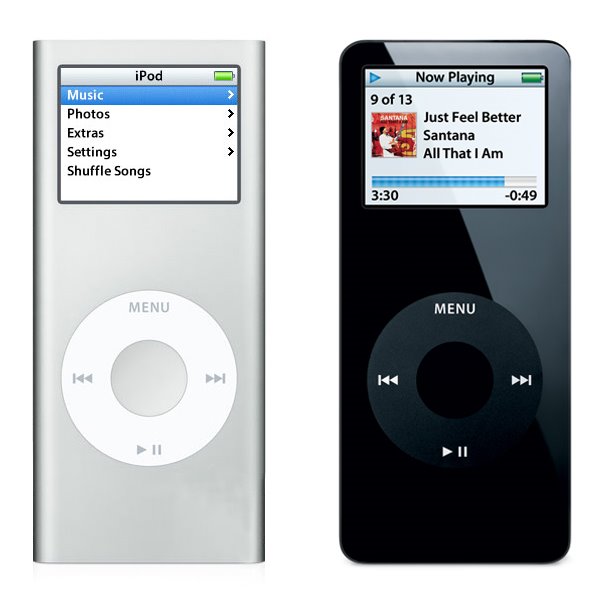
Apple announced some more hardware changes again today; the iPod Nano line is getting a full revamp. Very, very similar to the iPod Mini, the new Nano features an anodized aluminum outer skin, and capacities that include a 2GB, 4GB and now an 8GB model. The new device is also a little slimmer, measuring a measly 0.26" in thickness, although otherwise retaining the same dimensions as the previous incarnation of the Nano (3.5" high by 1.6" wide, with a weight of 1.41 ounces). Apple also claims that the new device has an increased battery life.

The following picture shows a side by side comparison, to scale, of the newer Nano on the left, and the first generation Nano on the right:

I own a first generation Nano, and I am very happy with it so far. I also have a first generation iPod Mini, and I also enjoyed it. I've come to expect Apple to update the iPod line on a regular basis now, and each time, they seem to come up with new innovations that keep them in the lead in this very aggressive market.

Let's see what they'll come up with next...

Monday, September 11, 2006

Replacing my Mighty mouse...

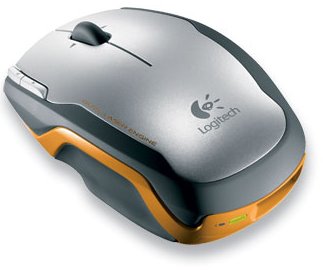
I had some mixed feelings about my Apple Mighty mouse, and since I have always eventually replaced the stock Apple mice with another device, I thought I might once again, try something new. Don't get me wrong, I think the Might mouse is not a bad mouse. Once you've tried the Scroll Ball, you'll have a hard time going without, but another device caught my eye, and now that I've had a chance to try it with my iMac, I think that I have found the replacement mouse I was looking for. The Logitech V400 Wireless Laser mouse is a great wireless pointing device:


Logitech has incorporated pretty much all of the current technology in wireless mice into this particular model. It uses a dual laser to apparently increase the level of precision, and the wireless portion uses 2.4GHz rather than 27MHz used in some other competing devices. I know what some of you may be thinking: "2.4GHz, hey that's the same as my cordless phone, wireless network and so on, won't there be interference?" Well, I have some wireless phone, a wireless network and I have yet to experience any issues with interference.

This mouse includes five buttons, a scroll wheel with side scroll capability and is a real pleasure to use. The buttons have an excellent feel (except the small accessory buttons, which are somewhat harder to use), and the track wheel is slight notched and provides just the right amount of tactile feedback. The mouse is a bit on the small side, and is marketed towards the business traveller, as Logitech states that this mouse is built using a rugged chassis, to survive the rigors of travel. Personally, I like that the wireless adapter stores in the back of the mouse, while serving to turn the mouse on or off. This can be a real blessing, as when the mouse is stored in this manner, you can be assured that it is off. I do not have any experience yet with battery life, but I have inserted the included Duracell AA battery (a single battery only), and I will report on the battery life.

Overall, a great device that I highly recommend!

Wednesday, September 6, 2006

New from Apple...

Apple announced a number of hardware changes today, starting with the iMac with 24" screen, which includes the new Intel Core 2 Duo, running at either 2.16 or 2.33GHz. The 24" iMac also includes something that several Apple users have complained about in the past, Firewire 800 (1 port), as well as a Firewire 400 port. Of course, as the new iMac makes use of the new processor family, the other iMacs have also been upgraded to the Core 2 Duo line of CPUs. The line now includes the iMac 17", with either the 1.83 or 2.00GHz processor, the iMac 20", with 2.16GHz processor and the aformentionned iMac 24", with the 2.16 or 2.33GHz processor.

As I had mentionned in a previous post, some changes were also made to the Mac Mini line, with changes to the processor familly, namely to the Core Duo processor. The line now includes the Mac Mini with 1.66GHz Core Duo processor without Superdrive or the 1.83GHz Core Duo processor with Superdrive. Of course, the only thing Apple is talking about is the change to the iMac line... It is the showstopper, and I think that it is reasonable to expect a 30" iMac at some point in the future, based on the existing monitor made by Apple.

Wednesday, August 30, 2006

Rumours of Mac Mini hardware update...

Rumours have been flying around about some proposed changes to the Mac Mini line. According to these latest rumours, Apple would keep the existing 1.66 GHz Core Duo model, and add a 1.83 GHz Core Duo model, while dropping the 1.5GHz Core Solo model. This decision would eliminate any Core Solo platforms from Apple's line of computers. No timelines have been indicated yet, but information is sure to leak out any time... Keep in mind that Apple did the same thing to the Mac Mini last year, without advertising the changes in hardware that were made to the model line. Several analysts have suggested that Apple has chosen to follow this strategy in order to liquidate inventory without having to resort to drastic retail price cuts.

More information can be found over at Think Secret, as well as lots of assorted news and rumours...

Monday, August 28, 2006

My impressions so far...

After using my new 20" Dual Core iMac for a few weeks now, I can safely say that I made a good purchase. Of course, as with any new system, I've encoutered some strange behaviour, but most of that has been dealt with. Last week, I removed the 512 MB of RAM installed in my system and replaced it with a Kingston KTA-MB667/1G stick of RAM; 1GB chip, with the option to install a second one later on. Although I don't have numbers to verify my claims, the system performs better as a whole; all applications launch faster, all Finder operations seem snappier than before. All in all, a wise choice to upgrade. The surprising part was that I got this memory upgrade from CompuSmart, of all places; they have been maintaining a small Apple section, and I will continue to go there because of this...

The upgrade is where one strange thing happened. The day before I upgraded my RAM, I found that my Airport hardware just seemed to vanish from the system. No amount of coaxing would get the hardware detected. I rebooted twice, to no avail. The following day, after installing the new RAM, I relaunched the system, and lo and behold, the Airport was back. I have no explanation, but I am happy that it is back.

I have also added an APC ES 650 UPS to my setup:


The easy to install software allows me to monitor the status of the UPS, as well as provide some parameters for safe shutdown of my system in case of a power failure. As the ES 650 provides 8 outlets (4 surge protected and 4 surge protected and UPS protected), I decided to connect my DSL modem, wireless router and iMac to the UPS side of things. Might as well protect my entire setup.

On the software side of things, I have installed MySQL, made some modifications to the PHP config file and installed Moodle, the open source LMS that I had experimented with in the past. The platform has truly matured and it is a really great application to play around with, especially in my professional field. My preliminary examination of the platform has yielded some great ideas for the future. I also took the time to install a new Preference Pane, that allows me to easily launch and shutdown the MySQL server. On another topic, I replaced the official BitTorrent client for Transmission, a freeware BitTorrent client, and let me say that Transmission has so far blown the pants right off the official client. I highly recommend this software, if only for its automatic management of ratios and seeding.

More news later...

Wednesday, August 16, 2006

On the purchase on my new Intel Dual Core iMac 20"...

I finally broke down and purchased my new Mac; I got a great deal from Best Buy, who although had the sam price as everyone else, gave a free iPod Nano (1GB) model to anyone purchasing an iMac. It was a no brainer... I decided to get a 512MB RAM model, as I can purchase RAM separately and save almost 200$ in the process. As for the hard drive upgrade, all I can say is that I am satisfied with the present capacity, with the 250GB SATA drive currently installed.

As soon as I got it home, I unpacked it and connected it by FireWire, to my Cube. It took only a few moments, and I was able to browse the Cube from the iMac. I transferred all of my documents, data and files over to the iMac, then connnected it to the router, so that I could get connected to my Powermac. I proceeded to transfer a copy of my Music folder to the iMac, as well as all of my images and movies. With this transfer complete, I wiped the information from the Powermac and liberated almost 85GB of storage space. And with the ability to burn DVD with the iMac, I have been archiving some data on DVD; I may just have to pick up a pack of the Dual Layer DVD-R, with even more capacity.

So far, I am tremendously satisfied with my purchase. It is a very noticeable increase in speed and performance, as well as a definite upgrade where the monitor is concerned. Seeing the iMac and my old 17" monitor side by side really hammered that point in, with the sharpness, brightness and overall size of the iMac LCD dwarfing the 17" CRT.

More on the iMac once I have more information to report...