Showing posts with label Apple. Show all posts

Sunday, September 20, 2009

New iPod Nano

Well, Apple has released a new generation of the iPod Nano, and once again, they've added features that make the device even more useful than it used to be. Taking a cue from the newly released third generation iPod Shuffle as well as the iPod Touch (and iPhone, of course), the new iPod Nano has incorporated many new features that set it above the average player. First is the Voice Over feature, which tells you the song name and who’s performing it without interrupting the music; it's available in over twenty languages, including: Chinese (Cantonese), Chinese (Mandarin), Czech, Danish, Dutch, English, Finnish, French, German, Greek, Italian, Japanese, Korean, Norwegian, Polish, Portuguese, Russian, Spanish, Swedish and Turkish.

Second, the new Nano features a video camera with 640 by 480 pixels in H.264, up to 30 frames per second with AAC audio to boot! There are even some live effects which can be used with the video, including Sepia, Black and White, X-Ray, Film Grain, Thermal, Security Cam, Cyborg, Bulge, Kaleido, Motion Blur, Mirror, Light Tunnel, Dent, Stretch, and Twirl.

But that's just the first part; one of the interesting sub-functionality of this setup is the addition of the microphone. Apple has thoughtfully added a voice recording functionality into the menu.

Apart from this new multimedia functionality, Apple has also added another often requested feature: an FM tuner, with a few additions thrown in of course. The feed feature identifies stations and songs (if the information is broadcast) which is always a nice way to find out about new music, and the Live Pause feature, which allows you to pause live radio broadcasts, and rewind up to 15 minutes! It's like a PVR, but for radio! A nice feature in my opinion. In the past, there have been accessories that provided the same function, but it's nice to have it built-in.

One of the nice things about the iPod series is the support for several high quality audio formats, including Apple's own AAC (8 to 320 Kbps), Protected AAC (from iTunes Store), HE-AAC, MP3 (8 to 320 Kbps), MP3 VBR, Audible (formats 2, 3, 4, Audible Enhanced Audio, AAX, and AAX+), Apple Lossless, AIFF, and WAV.

The Nano now sports a polished anodized finish in 9 different colours, including silver, black, red (from Apple only), yellow (from Apple only), blue, purple, pink, green, and orange:

If you are in the market for a new MP3 player, head to your nearest Apple store, or any electronic retailer, and take a look at the new Nano. It might just be the one for you.

Monday, July 27, 2009

Pick of the week: VersionTracker

Like almost every computer user today, I sometimes struggle to get all the updates to the software titles that I use on my computers, let alone find out about new software. There are many software repositories available online, but sadly, they are mostly for the Windows platform, and that is not too helpful for me, being an Apple user (my wife and I are both Apple users). But there is one that I have found to be helpful, well organized and current and that site is VersionTracker.

VersionTracker provides a list-type interface, as well as separate tabs for Windows, OS X, iPhone and the Palm OS.

If you use any of these software platform and didn't know about Version Tracker, head over right now. You'll be glad you did.

Friday, July 10, 2009

New Macbook Pro 13"

The Macbook Pro product line has just received some minor upgrades and a new model, the 13" Macbook Pro. And although initially, it did not look like a huge change, after further consideration, it seems like Apple has really hit on a great combination of functionality, design and price, making the Macbook Pro 13 available to almost everyone.

Here are the specs for the two new models of the 13" Pro:

Size and weight

Height: 0.95 inch (2.41 cm)
Width: 12.78 inches (32.5 cm)
Depth: 8.94 inches (22.7 cm)
Weight: 4.5 pounds (2.04 kg)

Connections and expansion

* MagSafe power port
* Gigabit Ethernet port
* One FireWire 800 port (up to 800 Mbps)
* One Mini DisplayPort
* Two USB 2.0 ports (up to 480 Mbps)
* One SD card slot
* Audio in/out (combined)
* Kensington lock slot

Communications


* Built-in AirPort Extreme Wi-Fi wireless networking (based on IEEE 802.11n draft specification); IEEE 802.11a/b/g compatible
* Bluetooth Built-in Bluetooth 2.1 + EDR (Enhanced Data Rate)
* Built-in 10/100/1000BASE-T Gigabit Ethernet (RJ-45 connector)

Audio

* Built-in stereo speakers
* Built-in omnidirectional microphone
* Combined optical digital output/headphone out (user-selectable analog audio line in)
* Supports Apple Stereo Headset with microphone

Display

* 13.3-inch (diagonal) LED-backlit glossy widescreen display with support for millions of colors
* Supported resolutions: 1280 by 800 (native), 1152 by 720, 1024 by 640, and 800 by 500 pixels at 16:10 aspect ratio; 1024 by 768, 800 by 600, and 640 by 480 pixels at 4:3 aspect ratio; 1024 by 768, 800 by 600, and 640 by 480 pixels at 4:3 aspect ratio stretched; 720 by 480 pixels at 3:2 aspect ratio; 720 by 480 pixels at 3:2 aspect ratio stretched

Graphics and video support

* NVIDIA GeForce 9400M graphics processor with 256MB of DDR3 SDRAM shared with main memory3
* Dual display and video mirroring: Simultaneously supports full native resolution on the built-in display and up to 2560 by 1600 pixels on an external display, both at millions of colors
* iSightBuilt-in iSight camera
* Mini DisplayPort

Input

* Built-in full-size backlit keyboard with 78 (U.S.) or 79 (ISO) keys, including 12 function keys and 4 arrow keys (inverted “T” arrangement)
* Multi-Touch trackpad for precise cursor control; supports two-finger scrolling, pinch, rotate, swipe, three-finger swipe, four-finger swipe, tap, double-tap, and drag capabilities

Processor and memory

Intel Core 2 Duo

* 2.26GHz or 2.53GHz Intel Core 2 Duo processor with 3MB on-chip shared L2 cache running 1:1 with processor speed
* 1066MHz frontside bus
* 2GB (two 1GB SO-DIMMs) or 4GB (two 2GB SO-DIMMs) of 1066MHz DDR3 memory; two SO-DIMM slots support up to 8GB

Storage

* 160GB or 250GB 5400-rpm Serial ATA hard drive; optional 320GB or 500GB 5400-rpm hard drive, or 128GB or 256GB solid-state drive4
* 8x slot-loading SuperDrive (DVD±R DL/DVD±RW/CD-RW)
* Maximum write: 8x DVD-R, DVD+R; 4x DVD-R DL (double layer), DVD+R DL (double layer), DVD-RW, DVD+RW; 24x CD-R; 10x CD-RW
* Maximum read: 8x DVD-R, DVD+R, DVD-ROM; 6x DVD-ROM (double layer DVD-9), DVD-R DL (double layer), DVD+R DL (double layer), DVD-RW, DVD+RW; 24x CD

Battery and power

* Built-in 60-watt-hour lithium-polymer battery
* 60W MagSafe Power Adapter with cable management system
* MagSafe power port

And here are a few more images, including a comparison shot between the previous unibody Macbook and the new Macbook Pro:


Wednesday, January 2, 2008

Software review: iBank

I've decided that this year was the year I would get my finances back on track, and being a OSX user, I thought I would forego the usual PC choices and select an application that was designed from the ground up for this platform. This led me to iBank. Now, keep in mind, I'm not sure if this is the solution I would select if I was a multimillionaire, but I think that in my case, the scale of the application mirrors my needs perfectly.

I can tell this was designed by someone from my generation, when one of the built-in expense categories is Dining: Coffee! In my book, that truly deserves a category of it's own! Here's a look at the main interface:


It's been a pleasure setting up my budget, and the excellent Budget Monitor feature let's me see at a glance if I am sticking to my budget. With scheduled transactions, alarms and reminders indicate bills and due payments, so missed due dates are a thing of the past (knock on wood!):


I have been having some technical issues with the application though, with several crashes in the last couple of uses. Of course, I have not yet rebooted the system, and I would like to make sure that the OS is not the culprit here, rather than this program.

More to follow...

New Bluetooth keyboard

Hello all! First of all, my apologies for not creating a new post in quite a while, but I plan on making the most of 2008.

For my first post of the year, I thought we would take a look at Apple's new Bluetooth Wireless Keyboard:

This keyboard follows Apple's new design and improves on the portability of the keyboard by removing the extra numeric keyboard available on the wired version.

A side view of the keyboard is a testament to the minimalist design philosophy that Apple has adopted lately, and as some have said "either you love it or you hate it!"

Personally, I am in the LOVE camp, and I can't wait to get my grubby hands on one. I don't make much use of the Bluetooth functionalities of my Mac, and I think it's high time that I did. The keyboard is wisely powered by 3 AA format batteries (included with the initial purchase no less!!), and the smart power management turns the keyboard off during periods of inactivity, only to resume function as soon as the user begins typing again. I would really like to know what real-world power usage is like for one of these babies!

More information will follow as soon as I have performed some testing.

Until then...
---
Well, I do have an update. My wonderful wife got me a new Apple Keyboard for Christmas, and let me tell you, it is by far the best keyboard that I have had the chance to use. Not only aesthetically pleasing, this keyboard has a fantastic action that is the same as the wireless version. I was very happy to receive the wired version, as I make use of the USB ports on the keyboards, and these are still available on the new version.

A sweet keyboard!!

Sunday, March 18, 2007

And now, the iPhone

By now, most Apple fans have already seen the prototype iPhone that Steve Jobs revealed in his last presentation. And what a great looking device:


But is this the killer device that many people are speculating about, or is it another bloated, RIM clone that have been popping up here and there in the last couple years? To be honest, I'm not sure! I haven't had a chance to actually use one of these slick-looking devices. But from a conceptual point of view, I can't help but think that this isn't it... As you pick you jaw off the floor, please remember that I am an Apple fan, but first and foremost, I am a fan of great concepts! The iPhone (and never mind the legal issues surrounding the choice of names) is a great looking, and probably easy to use device, but it's not doing anything for me...


There are many schools of thought when it comes to the ultimate portable device; what types of features should these devices include are the primary areas of differences. What remains similar are the basic elements, such as the form factor, and weight, and even then, there have been noted differences in concepts, such as the Sony PSP:


or a different Sony solution, the UX390N:


and even the Nokia 770:


Everyone has a different idea of what this type of device should do, and so do I... I will reserve judgement until I can actually test the device out for myself.

Until then...

Monday, October 23, 2006

What about iTV?

For those who may not have heard the news, Apple is trying really hard to take over your living room. All kidding aside, Steve Jobs announced, during the last keynote presentation, that Apple was hard at work on a new device, codenamed iTV (since the name is already in use by Monster Cable, I doubt the name will stick!) and it was set to revolutionize your living room by bringing Apple smack-dab in the middle!

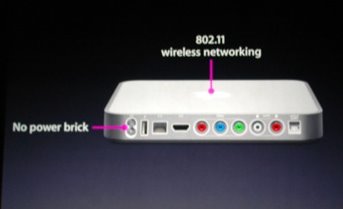
Of course, since the keynote, where some details about the capabilities of this new device were announced, there has been a lot of speculation about what would and would not be included at launch, scheduled for Q1 of 2007. Here is the shot that was displayed during the presentation:


As you can see, the iTV follows the form factor of the Mac Mini, and from the picture of the rear of the device, we can deduce some of the features:


During his speech, Steve Jobs alluded to some of the functions that will be available on the multimedia device:

  • HDMI connector (x1)

  • Component Video connectors (x1)

  • Audio L/R

  • Digital audio (x1)

  • Ethernet and 802.11g

  • USB 2.0

  • And a built-in power supply, eliminating any external power bricks

With this pretty impressive list of features, as well as full integration with iTunes on both the Mac and the PC platform, and an announced retail price of $299, Apple is going to make a dent in the multimedia market, that's sure.

Engadget has posted a hands-on review of a prototype device. As far as I can see, the prototype looks exactly like the device displayed during the keynote. Another hot debate going on is whether the iTV will support any PVR-type functionality, as well as a hard drive. Both topics remain to be seen!

The Sony PSP and Apple...

As soon as I saw the Sony PSP, I fell in love with it. I know, you may get a laugh out of this, but as a geek at heart, any neat gadget really gets my attention. And the PSP was great! I had to have one, and a few months ago, when an upcoming trip to India gave me reason to shell out the money, I bought my PSP. I purchased the Giga Pack, which Sony was promoting as a great deal: the PSP, a carry case, a 1GB Memory Stick Duo card. I also wound up pickup up a couple games (for your information, Grand Theft Auto: Liberty City Stories and Syphon Filter, both excellent games in my opinion).

In the time I've had my PSP, several friends have suggested that I mod it, but I didn't want to go that route, because I just don't find any advantage to free gaming, if I need to get memory cards to store these games. But my concern has come with my platform of choice, OS X. Since the PSP has USB connectivity, the thought that both devices would be fully compatible did cross my mind!!!

For those who are not aware, the PSP is compatible, in a sense, with OS X. It is possible to browse the PSP once connected and mounted, but unfortunately, it is not possible to properly format and delete data. I imagine that this is due to some restrictions based on write format, but no matter. There are several solutions that have cropped up, and here are a few of them:

1. PSP Ware: In my opinion, PSP Ware, by Nullriver Software, is by far the best solution available for OS X users. Once installed, PSP Ware allows a Mac user to sync their PSP with their Mac. Users are able to select music from their iTunes library, images from their iPhoto library, convert movie files and DVD to PSP format, sync bookmarks from Safari, backup saved games and more. This application also allows users to manager multiple memory sticks, simply and securely. This application currently sells for $15.00 and is up to version 2.5.1.

2. iPSP: iPSP by RnSK Softronics provides the same type of functionality as PSP Ware above, although it also includes some features that can make it very useful in conjunction with a "modded" PSP. The ability to sync homebrew applications is a great feature, as well as some advanced file management options make this a worthy competitor to PSP Ware.

Of course, for those who do not want or need an all in one solution, there are several applications that can be used to extract, rip and compress video to PSP standards. Most of these tools work very quickly on the OS X platform, and based on your specific requirements, may suit your needs better than the two proposed programs listed above.

Explore and have fun!

Wednesday, September 13, 2006

Apple is upgrading the iPod Nano and the iPod Shuffle..

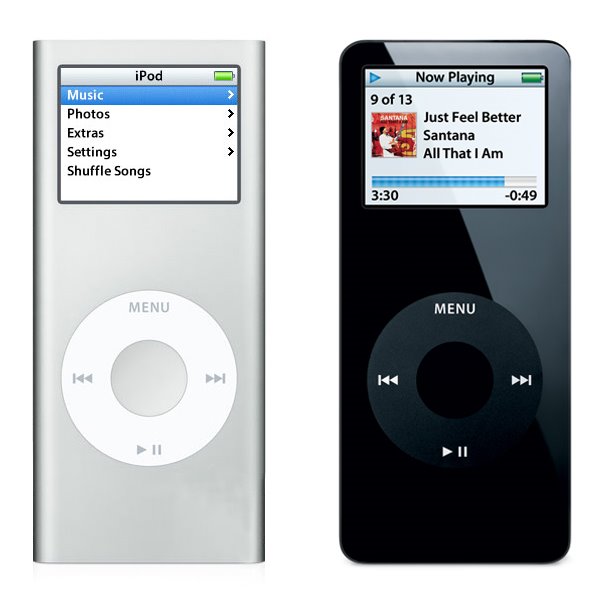
Apple announced some more hardware changes again today; the iPod Nano line is getting a full revamp. Very, very similar to the iPod Mini, the new Nano features an anodized aluminum outer skin, and capacities that include a 2GB, 4GB and now an 8GB model. The new device is also a little slimmer, measuring a measly 0.26" in thickness, although otherwise retaining the same dimensions as the previous incarnation of the Nano (3.5" high by 1.6" wide, with a weight of 1.41 ounces). Apple also claims that the new device has an increased battery life.

The following picture shows a side by side comparison, to scale, of the newer Nano on the left, and the first generation Nano on the right:

I own a first generation Nano, and I am very happy with it so far. I also have a first generation iPod Mini, and I also enjoyed it. I've come to expect Apple to update the iPod line on a regular basis now, and each time, they seem to come up with new innovations that keep them in the lead in this very aggressive market.

Let's see what they'll come up with next...

Wednesday, September 6, 2006

New from Apple...

Apple announced a number of hardware changes today, starting with the iMac with 24" screen, which includes the new Intel Core 2 Duo, running at either 2.16 or 2.33GHz. The 24" iMac also includes something that several Apple users have complained about in the past, Firewire 800 (1 port), as well as a Firewire 400 port. Of course, as the new iMac makes use of the new processor family, the other iMacs have also been upgraded to the Core 2 Duo line of CPUs. The line now includes the iMac 17", with either the 1.83 or 2.00GHz processor, the iMac 20", with 2.16GHz processor and the aformentionned iMac 24", with the 2.16 or 2.33GHz processor.

As I had mentionned in a previous post, some changes were also made to the Mac Mini line, with changes to the processor familly, namely to the Core Duo processor. The line now includes the Mac Mini with 1.66GHz Core Duo processor without Superdrive or the 1.83GHz Core Duo processor with Superdrive. Of course, the only thing Apple is talking about is the change to the iMac line... It is the showstopper, and I think that it is reasonable to expect a 30" iMac at some point in the future, based on the existing monitor made by Apple.

Thursday, August 31, 2006

Unlocking the power of iTunes 2: Adding new visualizations

In our previous encounter, we learned about the various controls available from the keyboard in iTunes, specifically for controls related to visualizations... Well now, we need to learn how to add new visualizations to accompany the Visualizer provided by Apple.

This process is really broken down into two steps:

1. Locate and download a new visualization for iTunes

2. Move (or copy) the new visualization to the iTunes folder

There are several places to begin searching for new visualizations; an easy first choice is Google, followed by Apple's Downloads section. When one or more visualizations have been downloaded, it is time to move (or copy) them to the iTunes folder, in a specific place. The path to use is:

User folder / Library / iTunes / iTunes Plug-Ins


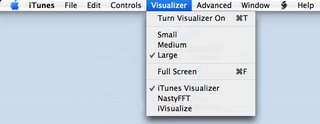
All new visualizations need to be placed within this folder. If iTunes was running, quit and relaunch the application, and the new visualizations should be available to select from the Visualizer menu, as can be seen in the image below:


Have fun and see what else is available; I've been really enjoying one called NastyFFT, a great real-time, colour-switching spectrum analyzer...

Keep in mind that using the path provided above installs the new visualizations for the active user only, and not every user on the system. In order to have visualizations available to every user, move (or copy) the visualizations to the following folder:

Hard drive / Library / iTunes / iTunes Plug-Ins

In our next installment, we will explore some options available using playlists and smart playlists!

Wednesday, August 30, 2006

Unlocking the power of iTunes 1: Visualization control

For those who have been using iTunes since it has come out, the following information might be old news, but for several new Apple users, this might be entirely new. iTunes is a fairly straightforward application to use, and most users, although proficient, are only aware of about 75% of what iTunes is capable of doing. This article will deal with the control of visualizations in iTunes. As you may already be aware, Apple has included a fairly complex, if somewhat psychadelic, set of visualizations for iTunes. These visualizations are built on a three concept: one layer, labelled the Visualization Form, a second layer, labelled the Visualization Effect and a third layer, labelled Visualization Colour. It is the combination of these three independant layers that creates the seemingly endless possibilities of Apple's visualizations.


But now that we are aware of these layers, a question that comes to mind is how many are there and are they listed? Well, yes, and someone has gone through the trouble of listing the contents of these layers at Winston's iTunes Cheet Sheet. Apple has thoughtfully provided several keyboard controls for iTunes that are simply not published for consumers. Some of these keyboard controls are specifically for the advanced control of visualizations.

The three following controls, which allow the user to toggle each layer independantly, is used to create a specific combination of layers to reach a desired visual effect. These controls are:

  • Q / W - toggle visualization "form"


  • A / S - toggle visualization "effect"


  • Z / X - toggle visualization "color"


Once a desired combination is reached, it can be frozen, or saved and assigned to a designated numerical key by using other commands. This can be an interesting addition for anyone using iTunes in a DJ setting, as it provides the ability to project a programmed visualization on cue. Here are these additional commands:

  • D - Reset Visualization to default


  • N - toggle Normal or high-contrast colors


  • M - Manually select config mode (user, freeze, random)


  • R- Randomly select config mode


  • C - display Current visualization config


  • NUM keys - user config presets (use SHIFT and # to record a preset)


Have fun experimenting with these settings. They can provide a new and interesting feature to a great media player like iTunes.

In the next installment, we will look at adding new visualizations to iTunes and where these can be procured...

New addition to Apple's Board of Directors...

In a press release announced today, Apple Computer Inc. indicated that Dr. Eric Schmidt was named to Apple's Board of Directors. With the addition of Dr. Schmidt, the Board of Directors now numbers eight, and includes:


  1. Fred D. Anderson, Partner, Elevation Partners and former CFO (Chief Financial Officer), Apple Computer, Inc.


  2. Bill Campbell, Chairman and former CEO Intuit Corp.


  3. Millard Drexler, Chairman and CEO J. Crew


  4. Albert Gore Jr., Former Vice President of the United States


  5. Steve Jobs, CEO, Apple


  6. Arthur D. Levinson, Ph. D., Chairman and CEO Genentech


  7. Jerry York, Chairman, President and CEO Harwinton Capital


  8. and

  9. Dr. Eric Schmidt, CEO Google


Dr. Schmidt has a long resume, which includes his current positions as CEO of Google, as a member of the Google board of directors, and finally, as a member of the Princeton University board of trustees. He was also formerly the CEO of Novell as well as the CTO (Chief Technology Officer) at Sun Microsystems Inc.

"Eric is obviously doing a terrific job as CEO of Google, and we look forward to his contributions as a member of Apple's board of directors," said Steve Jobs, Apple's CEO. "Like Apple, Google is very focused on innovation and we think Eric's insights and experience will be very valuable in helping to guide Apple in the years ahead."

Rumours of Mac Mini hardware update...

Rumours have been flying around about some proposed changes to the Mac Mini line. According to these latest rumours, Apple would keep the existing 1.66 GHz Core Duo model, and add a 1.83 GHz Core Duo model, while dropping the 1.5GHz Core Solo model. This decision would eliminate any Core Solo platforms from Apple's line of computers. No timelines have been indicated yet, but information is sure to leak out any time... Keep in mind that Apple did the same thing to the Mac Mini last year, without advertising the changes in hardware that were made to the model line. Several analysts have suggested that Apple has chosen to follow this strategy in order to liquidate inventory without having to resort to drastic retail price cuts.

More information can be found over at Think Secret, as well as lots of assorted news and rumours...

Monday, August 28, 2006

Using scripts with iTunes...

It has come to my attention that several friends of mine have been using iTunes as their primary media player for a little while now, and although many of them are PC users, there are a few that are Apple users. And it is for these people that I write today; I would like to teach you to add functionalities to iTunes using some pre-built scripts. These scripts are Applescripts, and they can provide you with the ability to make iTunes work exactly the way you want.

This is a three step process, so here goes:

1. The first step is to locate the folder user/Library/iTunes and insert a new folder labelled Scripts.

2. Locate some existing scripts; a great site for this is Doug's Applescripts for iTunes site. So far, they have over 400 scripts available for free download.

3. Once you've downloaded a few scripts, unzip them and copy the scripts to the Scripts folder created earlier.

A new icon becomes available in the iTunes menu; this icon allows a user easy access to the new functions provided by the scripts.

Have fun...

Wednesday, August 16, 2006

On the purchase on my new Intel Dual Core iMac 20"...

I finally broke down and purchased my new Mac; I got a great deal from Best Buy, who although had the sam price as everyone else, gave a free iPod Nano (1GB) model to anyone purchasing an iMac. It was a no brainer... I decided to get a 512MB RAM model, as I can purchase RAM separately and save almost 200$ in the process. As for the hard drive upgrade, all I can say is that I am satisfied with the present capacity, with the 250GB SATA drive currently installed.

As soon as I got it home, I unpacked it and connected it by FireWire, to my Cube. It took only a few moments, and I was able to browse the Cube from the iMac. I transferred all of my documents, data and files over to the iMac, then connnected it to the router, so that I could get connected to my Powermac. I proceeded to transfer a copy of my Music folder to the iMac, as well as all of my images and movies. With this transfer complete, I wiped the information from the Powermac and liberated almost 85GB of storage space. And with the ability to burn DVD with the iMac, I have been archiving some data on DVD; I may just have to pick up a pack of the Dual Layer DVD-R, with even more capacity.

So far, I am tremendously satisfied with my purchase. It is a very noticeable increase in speed and performance, as well as a definite upgrade where the monitor is concerned. Seeing the iMac and my old 17" monitor side by side really hammered that point in, with the sharpness, brightness and overall size of the iMac LCD dwarfing the 17" CRT.

More on the iMac once I have more information to report...

Sunday, June 4, 2006

A new toy for Mac Mini owners...

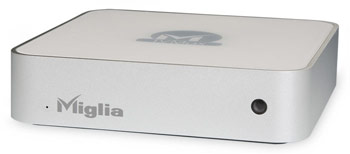
Although add-on drives have been available for the Mac Mini since almost day one, Miglia Technology has announced the availability of TVMax, an add-on drive with a twist; it has some very interesting digital video recorder functionalities while it perfectly matches Apple's Mac mini:


TVMax lets Mac users watch TV in window mode or full screen, convert VHS tapes to DVD quickly and easily and best of all, TVMax records in MPEG-2, MPEG-4 and DivX formats. When bundled with EyeTV 2.0, TVMax is also ideal for iPod Video owners thanks to the exclusive One Click iPod export function.

TVMax is bundled with EyeTV 2, which lets users watch, pause, rewind and skip forward live TV, schedule recordings, access online TV guides, edit recorded TV shows and more. TVMax is also supplied with an infrared remote control. The TVMax is priced at US$249.

Wednesday, May 31, 2006

Macbook Complete Specs...

Technical Specifications for the Macbook

In the Box

MacBook
Apple Remote
60W MagSafe Power Adapter, AC wall plug and power cord
Lithium-polymer battery
Install/restore DVDs
Printed and electronic documentation


Processor and memory

1.83GHz or 2.0GHz Intel Core Duo processor
2MB on-chip shared L2 cache
667MHz frontside bus
512MB of 667MHz DDR2 SDRAM (PC2-5300) on two SO-DIMMs; supports up to 2GB
Storage
60GB or 80GB 5400-rpm Serial ATA hard disk drive; optional 80GB, 100GB or 120GB drive2


One of the following optical drives:
Slot-loading Combo drive (DVD-ROM/CD-RW): reads DVDs at up to 8x speed, writes CD-R discs at up to 24x speed, writes CD-RW discs at up to 16x speed, reads CDs at up to 24x speed
Slot-loading SuperDrive with double-layer read support (DVD+R DL/DVD±RW/CD-RW): writes DVD-R and DVD+R discs at up to 4x speed, writes DVD-RW and DVD+RW discs at up to 4x speed, reads DVDs at up to 8x speed, writes CD-R discs at up to 24x speed, writes CD-RW discs at up to 10x speed, reads CDs at up to 24x speed


Graphics and Video Support
Intel GMA 950 graphics processor with 64MB of DDR2 SDRAM shared with main memory1
Extended desktop and video mirroring: Simultaneously supports full native resolution on the built-in display and up to 1920 x 1200 pixels on an external display, both at millions of colours

Built-in iSight camera with 640-by-480-pixel resolution

Mini-DVI port
DVI output using mini-DVI to DVI adapter (sold separately)
VGA output using mini-DVI to VGA adapter (sold separately)
Composite and S-video output using mini-DVI to video adapter (sold separately)

Communications
Built-in 10/100/1000BASE-T Gigabit Ethernet (RJ-45 connector)
Built-in 54-Mbps AirPort Extreme wireless networking (based on 802.11g standard)
Built-in Bluetooth 2.0 + Enhanced Data Rate (EDR) up to 3 Mbps
Optional external Apple USB Modem

Audio
Built-in stereo speakers
Combined optical digital audio input/audio line in (minijack)
Combined optical digital audio output/headphone out (minijack)

Battery and power
55-watt-hour lithium-polymer battery with integrated charge indicator LEDs
60W MagSafe Power Adapter with cable management system
MagSafe power adapter port

Display
13.3-inch (diagonal) glossy widescreen. TFT display with support for millions of colours
Supported resolutions: 1280 by 800 (native), 1152 by 720, 1024 by 768, 1024 by 640, 800 by 600, 800 by 500, 720 by 480, and 640 by 480 at 16:10 aspect ratio; 1024 by 768, 800 by 600, and 640 by 480 pixels at 4:3 aspect ratio; 720 by 480 at 3:2 aspect ratio

Electrical and environmental requirements
Meets ENERGY STAR requirements
Line voltage: 100-240V AC
Frequency: 50Hz to 60Hz
Operating temperature: 10° to 35° C
Storage temperature: -24° to 45° C
Relative humidity: 0% to 90% noncondensing
Maximum operating altitude: 10,000 feet
Maximum storage altitude: 15,000 feet
Maximum shipping altitude: 35,000 feet

Peripheral connections
One FireWire 400 port (up to 400 Mbps)
Two USB 2.0 ports (up to 480 Mbps)

Security
Kensington cable lock slot

Software
Mac OS X v10.4 Tiger (includes Spotlight, Dashboard, Mail, iChat AV, Safari, Address Book, QuickTime, iCal, DVD Player, Xcode Developer Tools)
iLife ’06 (includes iTunes, iPhoto, iMovie HD, iDVD, iWeb, GarageBand), Microsoft Office 2004 for Mac Test Drive, iWork (30-day trial), Big Bang Board Games, Comic Life, Omni Outliner, and Apple Hardware Test
Front Row

Input
Built-in full-size keyboard with 78 (U.S.) or 79 (ISO) keys, including 12 function keys, 4 arrow keys (inverted "T" arrangement), and embedded numeric keypad
Solid-state scrolling trackpad for precise cursor control; supports two-finger scrolling, tap, double-tap, and drag capabilities

Apple Remote

Size and weight
Height: 2.75 cm (1.08 inches)
Width: 32.5 cm (12.78 inches)
Depth: 22.7 cm (8.92 inches)
Weight: 2.36 kg (5.2 pounds)

The new Mac Book...

So Apple has finally announced the new Mac Book, and I have to say that I am fairly impressed so far... Those who know me also know that I have been in the market for a new computer (or two) lately, and this new addition by Apple is making my selection that much more difficult. Obviously, this new iBook replacement is based on the Inter Core Duo chip, and also includes Apple's new patented "glossy screen", which is not only brighter (a common complaint amongst iBook users), but has much better saturation, which makes images seem that much better! And, it's also available in glossy black, which is also a really nice change:


Head over to Apple's website and check it out for yourself, you may be pleasantly surprised; I know that my shopping list may just have to include one of these beauties!

Tuesday, May 23, 2006

Windows XP install on Mac Intel

As we may have all been reading lately, a winner has been declared in the running contest to get this done. The winner of the contest, known only as "narf," will pick up a cash prize of $13,854, accumulated through donations from contest supporters and other third-party sponsors. As reported in Ars Technica, here are some more details about this feat.

Here is what you'll need:

A Windows XP Pro (SP2) CD. Apparently, it does not have to be a bootable CD, but it does require the i386 directory at root level.

The xom.zip file.
Nero Burning ROM
A blank CD
A PC of course...
20-30 minutes

The instructions lay out the entire process in an abbreviated manner for those users who are more adept at performing "advanced" tasks like repartitioning drives and such, and in a more basic, step-by-step manner for users who might be slightly intimidated by the exercise. When you get down to it, you're creating a custom XP bootdisk, with some of the Microsoft files replaced with patched files created by narf. The files modified/added in the i386 folder are:

iaStor.sys
NTDETECT.COM
TXTSETUP.SIF
WINNT.SIF
XOM.INF

In addition there are several files being replaced and/or added in the $OEM$ directory:

$$/system32/drivers/xomdd.sys
$1/drivers/iastor/iaahci.cat
$1/drivers/iastor/iaahci.inf
$1/drivers/iastor/iaStor.cat
$1/drivers/iastor/iaStor.sys
$1/drivers/iastor/TXTSETUP.OEM

The final 5 items are replicated in the $OEM$/TEXTMODE directory. Once the custom Windows XP bootdisk has been developed, a repartition is required on the iMac's disk to contain both HFS+ and NTFS partitions, which for most people, means you're probably going to have to blow away your current install. Mac OS X will be installed to an HFS+ partition and you'll be installing an xom.efi bootloader which will then allow you to install Windows XP from your new disc.

At this point you're more or less dealing with a situation no different than your run-of-the-mill budget PC.